Kindle Paperwhite 11 Review
Amazon is no amateur when it comes to the e-reader game. Every since they released their first Kindle back in 2007 they’ve been destroying the competition when it comes to e-reader sales. There’s a sizeable amount of competition out there from the likes of Kobo and Nook but let’s be honest when you think e-reader you think Kindle. So, has the Kindle earned it’s place at the top of the e-reader hierarchy or is it simply just at the top because it’s from Amazon? I’ve owned 3 Kindles in my lifetime, here’s my thoughts on why the Kindle is still king.
Design
The Kindle lineup hasn’t seen any sort of wild redesigns in the past few iterations. Ever since the first Kindle Paperwhite was released, any sort of visual improvements have been simple reductions in bezel size and maybe a little bit of weight reduction. The overall design is almost identical. Big flat glass screen on the front with a black bezel around the edges with a small raised plastic lip coming from the plastic rear. Simple but effective. This one also weighs a smidge more than the last gen.

Since the previous 10th gen Paperwhite, the bezels have been slimmed down a nice amount and the screen size has gone up to a healthy 6.8 inches which makes the Paperwhite feel more book-like than ever. There’s still a bit of a bezel at the bottom for some reason but honestly it doesn’t really matter and it gives you a little bit to hold on to if you’re using the device with one hand.
One thing I’ve always liked about the Kindle is how robust it feels. It still remains slim yet somehow I feel safer throwing this around and chucking it into bags than I do with a phone. I think this strange trust I have must come from the plastic case as opposed to glass. Although plastic may be cheaper it doesn’t lessen the experience of using the device at all so it seems like a sensible choice to me.
The paperwhite is also waterproof with an IPX8 rating which means it can survive a dip in the pool or the bath. Although probably still best to not do it intentionally as salt water and chlorine are definitely terrible for your Kindle.
Software
An e-reader is far more specific in it’s goals than a phone. This allows Amazon to design it’s entire software experience purely around making reading as simple as possible. The software on almost every modern generation of Kindle is almost exactly identical now. They now have an almost mobile-like method of navigating but maintain book-centric style.
Reading
The place you’ll likely spend most of your time is in an actual book. Amazon has kept this super simple. The page takes up the entire screen and they give you optional extras to show like time left in chapter, percentage of book read, the current time etc… These are all optional and if you prefer you can have your Kindle look exactly as a paperback would look. Me personally I prefer to have the percentage in the bottom right corner and the time left in chapter in the left. This means I can stop reading a chapter at bedtime if I know I’m going to be up for another hour or I can keep reading if there’s only a few minutes left. The time left calculation is calculated for each user and is of course only an estimate.
Navigation
Navigating in and out of books and through menus is accomplished with simple swipes. A swipe down brings you to a sort of control center type panel for changing brightness, colour temperature (on newer models), turning on wifi, dark mode and accesing the full settings page. These are nice settings that are good to have quick access to. A swipe up brings you to the overview screen which can be used to quickly skim your way through a book or to see an overview of a few pages at a time. I’ve personally never found a use for this and think it’s more suited to people using the Kindle to read research or textbooks which I think is rare.
A tap at the top of the screen is how you can sort of “pause” the book. Obviously a book doesn’t really need paused but this is the next closest thing. This screen is more of a hard stop than the other two which are for quick setting changes or page changes. A tap gives you options to change font sizes and families, search the book, read your notes/highlights, view bookmarks and to exit the book entirely.
Home and Library
The home screen by default is like a storefront. I didn’t really like this as it’s just Amazon advertising books to you the second you open the device. The Kindle is for reading. I do my shopping on my phone. (Although the fact you can no longer buy your Kindle books through the Amazon app is ludicrously stupid, thanks for that one Google). Luckily you can go to a library view which only shows the books you’ve purchased and you can remove the recommended books that Amazon advertises.

Ads and Book Covers
A quick note on Kindle’s that come with ads as well. Amazon will give you a small discount on your device if you purchase it with ads. These show up on your lock screen and on your home screen and I think cheapen the experience. You can pay to have them removed by going into your amazon account settings and paying a small charge of £10 which is the amount you would have saved by buying the version with ads in the first place. You used to be able to pester customer support to remove them for free but it looks like they’ve cottoned on to that little hack and they don’t seem to be able to do it anymore. Once you’ve removed the ads you can have your current book cover as your lock screen which is much nicer to look at.
Performance
The 11th gen Paperwhite really feels like a step up in performance compared to it’s predcessor. Navigating through menus and books just feels faster. There’s even a nice little page turn animation that you can enable that makes the page refresh look a little smoother. I mean really a Kindle doesn’t need to be that fast but it’s nice to not have to wait those few second between page refreshes.
Battery
Battery on Kindles hasn’t been a problem for a long time and this generation is no different. 10 weeks of battery is what’s being advertised and that’ll be if you keep Wi-Fi on and the screen brightness around the middle. If you want to you could have your Kindle last for months. USB-C charging is a very welcome addition however. Now the only device I have that needs an old fashioned micro-USB is my old Sennheiser HD4.50 BTNC headphones.
Variants
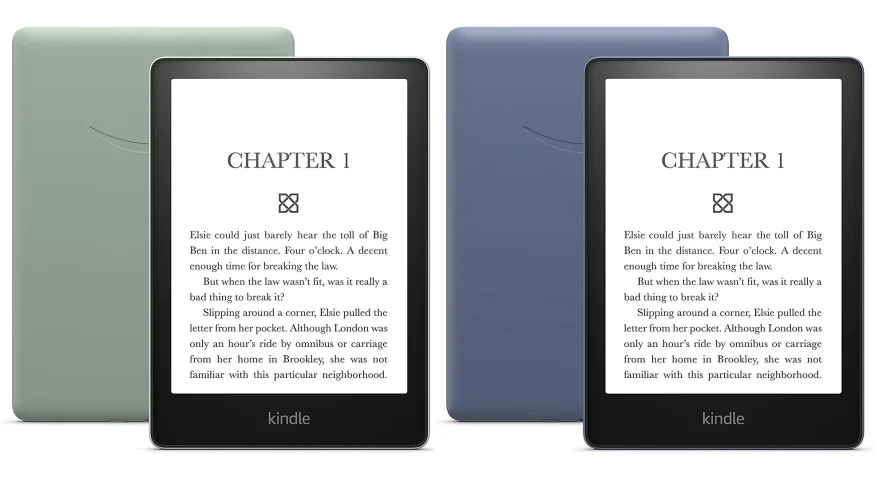
The 11th gen comes in three colour options now. Black, Agave Green and Denim, or Black, Green and Blue as they’re more commonly known. Companies love picking quirky colour names these days. The more colourful options are only available in the larger 16GB storage option however which is overkill for most people. Even if you downoaded every book you own onto the Kindle you’d be struggling to fill that space up. I don’t even download all my books, only the few I’m reading. They’re quick to download if you need them anyways. The only reason you’ll need the 16GB is if you use Audible but just listen to those from your phone, the Kindle is for reading not listening.
Verdict
The Kindle still reigns supreme. The ease of access to all the books that Amazon has and the fluidity of the software now just makes this device a great e-reader. Having the book cover on the lock screen really completes the book feeling and it’s just so nice to read on. If you’re getting one. 8GB is plenty. Pay for the no ads one unless you’re really pinching pennies and also have a quick check for screen defects because I’ve read that those can pop up from time to time. Also keep an eye out on big Amazon sale days, they tend to make big price cuts to their own family of products like Alexa speakers and Kindles and such. So yes I recommend the Kindle. You can buy one here if you want to help support me. Amazon will hopefully send a few pennies my way if you get one on my recommendation but but my honest opinion is I dont think the e-reader experience gets much better than this.
Oh yeh and if you have Amazon Prime keep an eye out for the free book you get every month. You should get an email that lets you pick one book out of a selection.

Leave a Reply